Questions and answers
Last changed: 31 March 2024
List of questions and answers
Here you will find questions and answers.
Can't find your question here then please send an email to info@ripatdba.nl
Q How can I show multiple domains in the server list?
A This works only in the licensed version.
It can be done in the field 'Environment' in the table 'Servers'. For example type 'Domain1 Dev'.
The space between 'Domain1' and 'Dev' is the seperator between what is used for the domain and the environment. In the non licensed version this will be ignored.
| free version | |
| no domain | multiple domains (ignored) |
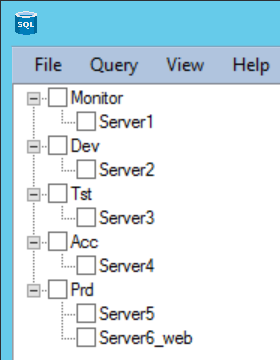 |
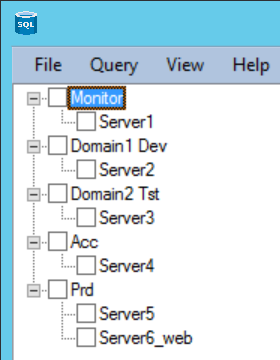 |
| licensed version | |
| no domain in licensed version | multiple domains in licensed version |
|
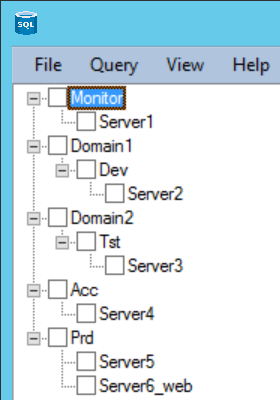 |
Q How can I get sorting in the headers of the tables?
A This works in both versions.
It can be done by adding these lines of text to the textfile with the query in it:
-- no spaces between /# and class while the program searches for this string
-- it must be the first line after the SQL statement
-- [0, 0] means the first column is sorted asc
-- this is also possible [0, 0], [1, 0]
/#class='tablesorter {sortlist: [[0, 0]]}'#/
other(cu2)
You can also put some extra info about what kind of order per field. It will look like this then:
-- other(cu2) means show the table with sortable columns
-- no spaces between /# and class while the program searches for this string
-- it must be the first line after the SQL statement
-- [0, 0] means the first column is sorted asc
-- this is also possible [0, 0], [1, 0]
/#class='tablesorter {sortlist: [[1, 0]]}'#/
-- columns specification can be applied to the columns for correct ordering
-- when applied the number of columns must be identical to the number of fields in the select otherwise they will be discarded
-- example: sort columns x as text = class='sorter-text', column x is not sortable = class='sorter-false', sort columns x as textclass='sorter-digit'
/#column(,,, class='sorter-text', class='sorter-text', class='sorter-text', class='sorter-text',,,,)#/
other(cu2)
The sort above is on the second column ascending. The fourth, fifth, sixth and seventh column will be sorted as text. In total there are eleven columns.
Some of the textfiles already contain this ordering infromation i.e. database_show_database_properties.txt.
Q Wat is the default authentication to connect to a remote server?
A If the domain of a server is the same as of the monitor server then Windows authentication will be used.
Q How can I force SQL authentication?
A If you want to connect with SQL authentication then the domain of that server needs to be different as of the monitor server. If it is the same then simply place a space behind the domain in the field 'Domain' in the table 'Servers'. You will also fill the fields 'Login' en 'Password' in the table 'Servers'. This will be plain text. In the licensed version encrypted SQL authentication is used. If you want to use SQL authentication in the licensed version then please contact us. We will then provide you with explanation and an encryptiontool to encrypt names en passwords. These encrypted data should be entered in the fields 'Login' en 'Password' in the table 'Servers'.
Q How can I use an IP-number instead of a servername?
A If the domain of the server is different then the domain of the monitor server then the field 'ServerIP' in the table 'Servers' is used when it is filled. Is the domain the same then you could add a space behind the domain in the field 'Domain' in the table 'Servers'. Is the field 'ServerIP' empty the servername is used.
Q How can I get a graphical line report?
A The libraries are alreay included into the zipfile. Look into a SQL file like i.e. server_free_disk_space_historical_graphically_30_days.txt.
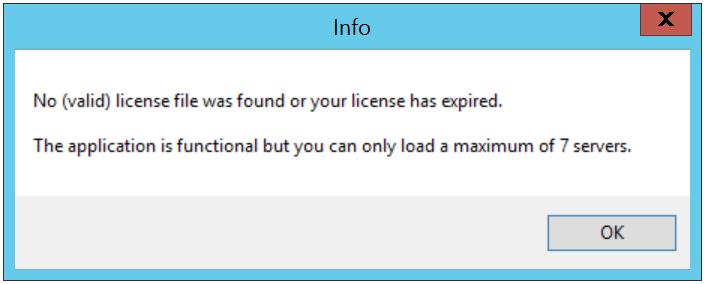
Q What happens when the license is expired for a user?
A You can still run the program but then only 7 servers can be loaded and in the graphs you will only see two series. Also every x executions of a query an info message will appear. All other functionality remains the same.
Q Why do some menuitems do not work or give an error message?
A Some menuitems for collected (graphical) database, diskspace or serverinformation work only if the extra tables have been created and filled with data.
If not used these menuitem can be removed from the file menu.xml.
Q Several files end with specific statements. What do they do?
A graph(030) -- 030 means show the data graphically from the last 30 days with a predefined query
graph(060) -- 060 means show the data graphically from the last 60 days with a predefined query
graph(090) -- 090 means show the data graphically from the last 90 days with a predefined query
graph(c30) -- c30 means show the data graphically (the days can be modified in the query itself)
graph(c60) -- c60 means show the data graphically (the days can be modified in the query itself)
graph(c90) -- c90 means show the data graphically (the days can be modified in the query itself)
graph(cu1) -- graph(cu1) means show the local graphical data with a predefined query and show a custom date selector
graph(cu2) -- graph(cu2) means show the local graphical data with an entry form, the start and end date and time will be replaced by the selected values
graph(cu3) -- graph(cu3) means show the remote graphical data with an entry form, the start and end date and time will be replaced by the selected values
graph(cu4) -- graph(cu4) means show the local graphical data, show date selectors and an extra field which is used here to fill the databasename
other(cu1) -- other(cu1) means show the output in a compressed table format
other(cu2) -- other(cu2) means show the table with sortable columns
other(cu3) -- other(cu3) means show the output in two columns
other(cu4) -- other(cu4) means show the output in two scrollable columns
other(cu5) -- other(cu5) means an extra field which is used here to fill the variable @SourceDir
Q Place for more questions ....
A ...
